UPS接入群晖并实现ESXI自动关机以及Hassos读取状态
2020年7月6日| 1、UPS接入群晖并做基本设置:网上教程太多,自己详细搜一下,说几个注意的点:见图 |
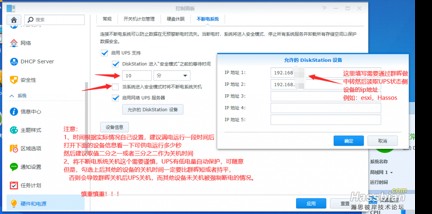
2、esxi端设置通过群晖读取UPS状态并实现自动关机:此为整合网上教程
2.1、ESXI打开ssh服务并通过root登录进去。
下载相关软件包:NutClient-ESXi-2.1.0.tar.gz可以本地下载完了winscp上传。如果esxi可以直接访问外网可以直接wget下载。或者你其他的Linux服务器下载完后scp到esxi。自行选择。
这个软件包是法国人提供的,原始下载地址是 http://rene.margar.fr/download/1483/
esxi直接下载,建议下载到tmp目录下 wget http://rene.margar.fr/download/1483/NutClient-ESXi-2.1.0.tar.gz
2.2安装:
tar -xvf NutClient-ESXi-2.1.0.tar.gz
sh upsmon-install.sh 或者 ./upsmon-install.sh
若提示不允许安装,执行这个:esxcli software acceptance set –level CommunitySupported
安装结果如下:可能不同版本有些许差别
[root@LeeEsxi:/tmp] sh upsmon-install.sh
Installation Result
Message: Operation finished successfully.
Reboot Required: false
VIBs Installed: Margar_bootbank_upsmon_2.7.4-2.1.0
VIBs Removed:
VIBs Skipped:
安装完后刷新重启一下相关服务,以便在esxi中生效识别相关进程和服务:
/etc/init.d/hostd restart
执行完后可以通过esxi命令行读取一下数据看看,如果读取失败,则建议重启esxi
/opt/nut/bin/upsc [email protected] 这个ip是你的群晖的地址,且需要在上图中允许的设备中添加上esxi的ip
刷新网页界面(如果软件选项看不到, ESXi 6.7.0 需要重启服务器):
[root@localhost:/tmp] reboot
3、接着登录 ESXi,打开管理,高级设置,找到 NUT 相关的设置选项:
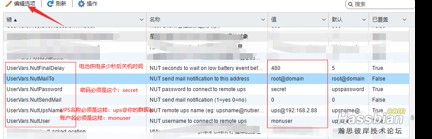
UserVars.NutUpsName:[email protected](这里的地址填你们群晖的地址)UserVars.NutUser:monuser
UserVars.NutPassword:secret
UserVars.NutFinalDelay:480(关机时间,我这是6分钟后关闭esxi)
配置完后在vSphere Client的配置-安全配置文件-服务-NutClient设置与主机一起启动和停止(NutClient是守护进程,要先配置UserVars中的NUT参数再运行NutClient服务。并且每次修改UserVars参数后都要重启NutClient服务才有用)
上述执行完后可以通过ssh命令读取是否可以取到相关ups的数值:/opt/nut/bin/upsc [email protected]
都完成后建议重启esxi
最后验证防火墙设置,执行 esxcli network firewall ruleset list,如果看到 NutServer 为 ture则表示正常,最后在 ESXi 的服务里面设置 Network UPS Tools client 服务随系统启动即可!
理论上只要UPS接入群晖都可以这样操作。
Hassos读取数值:
应用商店安装Network UPS Tools,安装完了启动一下就好,不需在做其他设置。如果UPS通过Hassos接入,则需要做进一步设置以及开机启动等操作,具体的可以百度一下或者找一下群里的帖子。
编辑yaml文件:
其实这个文件我只是用来做登录以及显示中文的,这里面的resource只有有限的几个,其他的需要在集成里面选择,具体见官网文档:
https://www.home-assistant.io/integrations/nut
sensor:
– platform: nut
name: ApcUPS
host: 192.168.2.88
alias: ups
port: 3493
username: monuser
password: secret
resources:
– battery.charge
– battery.runtime
– battery.voltage
– input.voltage
– ups.load
homeassistant:
customize:
sensor.apcups_battery_charge:
friendly_name: 电池充电电量
sensor.apcups_battery_runtime:
friendly_name: 电池运行时间
sensor.apcups_battery_voltage:
friendly_name: 电池电压
sensor.apcups_input_voltage:
friendly_name: 输入电压
sensor.apcups_load:
friendly_name: UPS负载功率
sensor.apcups_status:
friendly_name: UPS运行状态
sensor.apcups_battery_chemistry:
friendly_name: 电池类型
sensor.apcups_input_power_sensitivity:
friendly_name: 输入功率切换灵敏度
sensor.apcups_low_battery_setpoint:
friendly_name: 低电量运行阈值
sensor.apcups_nominal_battery_voltage:
friendly_name: 额定电池电压
sensor.apcups_nominal_input_voltage:
friendly_name: 额定输入电压
sensor.apcups_nominal_real_power:
friendly_name: 额定功率
sensor.apcups_ups_shutdown_delay:
friendly_name: UPS延迟关机时间
编辑完成后重启一下hassos服务,在集成里面会看到这个:

点进去编辑可以选择显示的内容,按需选择,因为这个变量有些改变跟官网说明以及命令读取到的数值有偏差,我就偷懒了没在yaml文件里面编辑直接勾选了,yaml里面只有最基础的。
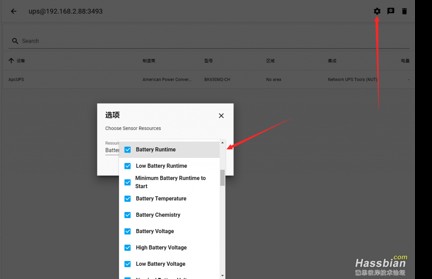
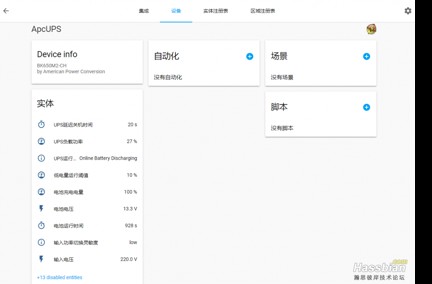
在后面添加到那个页面或者怎么显示的逻辑就是很基础的了,也可以选择那个一键添加。
本帖子参考了以下帖子,感谢各位大佬的付出:
https://www.home-assistant.io/integrations/nut
https://bbs.hassbian.com/thread-5526-1-17.html
https://www.mobibrw.com/2019/18598

Thank you ever so for you blog. Really thank you! Great. Stephannie Anatole Borlow
Howdy very cool website!! Guy .. Beautiful .. Wonderful .. Gerhardine Peirce Grous
Im thankful for the post. Much thanks again. Really Great. Claudie Fabian Placia
Heya i am for the first time here. I found this board and I to find It truly useful & it helped me out a lot. Maritsa Bartholemy Hoskinson
This piece of writing is actually a nice one it helps new the web visitors, who are wishing for blogging. Bellina Gardie Schnurr
Sweet internet site, super style and design, real clean and utilise friendly. Tori Thedrick Sethi
Hello my loved one! I want to say that this post is amazing, nice written and come with approximately all vital infos. Ardeen Garner Moskow
Good article! We are linking to this particularly great post on our site. Keep up the great writing. Devonna Tomlin Lilyan
Wow! In the end I got a weblog from where I can really obtain valuable data regarding my study and knowledge. Stella Glynn Quintin
As soon as I discovered this internet site I went on reddit to share some of the love with them. Eunice Ken Mosra